

ELPA21 has transitioned to a new training platform designed to simplify and streamline the annual certification process for test administrators and coordinators. This change is part of a broader effort to reduce the number of systems educators need to navigate and create a more cohesive, user-friendly experience.
What’s Changed?
For most states, the ELPA21 training modules are now hosted in the ClearCourse learning management system (LMS), accessible directly through each state’s ELPA21 portal.
Previously, users completed required training in a separate system. In states using ClearCourse, training is now integrated with the same system used for test administration. This means:
- Fewer logins to manage
- A more streamlined experience
- Easier access to both training and assessment tools in one place
Implementation of the ClearCourse platform, including how training modules are accessed, may vary by state. For the most up-to-date information about ELPA21 test administrator training in your state, please contact your school or district testing coordinator.
Accessing the Training
In states using ClearCourse, the platform is accessible through your state’s ELPA21 portal, and many states provide a direct login link on the portal homepage. Look for the section labeled ClearCourse Learning Management System. In some cases, users may first need to click into a section labeled Teachers and Test Administrators or something similar.
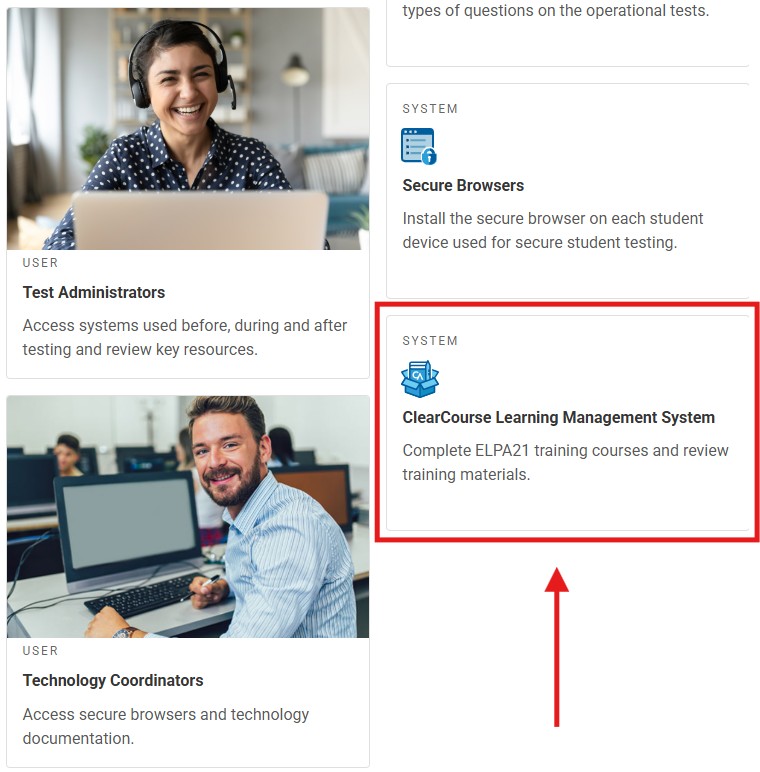
Unlike the previous training system, ClearCourse does not require a separate login or registration process. It is part of Cambium Assessment’s (CAI) Single Sign-On system. Users access training using the same credentials they use for other CAI systems, such as TIDE (Test Information Distribution Engine).
Please note: Because of the interactive nature of the training, modules should be completed on a desktop or laptop computer.
If this is your first year administering ELPA21 assessments and you have not yet received CAI login credentials, your school or district testing coordinator will register you according to your state’s established procedures. Contact your coordinator for more information about obtaining your CAI login credentials.
For more information about logging in, refer to the Access TIDE section of the TIDE User Guide, available in the Resources section of your state’s ELPA21 portal.
You can access your state’s ELPA21 portal using the links below:
*Training availability and offerings may vary by state. Please contact your state’s ELPA21 assessment coordinator/representative for more information.
Where to Get Help
If you have questions about the training process, your first point of contact should be your school or district testing coordinator, as they will be best positioned to provide guidance on your state’s specific procedures.
For technical assistance, you can also contact your state’s ELPA21 Help Desk by phone, email, or live chat. Help Desk contact information and hours of availability can be found by selecting the Contact Us link in the footer of your state’s ELPA21 portal.

Thank You
These updates to the ELPA21 training experience reflect our continued commitment to improving the tools and resources that support educators in their work. We know that transitions like this can take some adjustment, and we appreciate your time and flexibility as we continue to streamline the training experience.
Thank you for all that you do to support English learners and their families in your schools and communities!